Secondary Servers
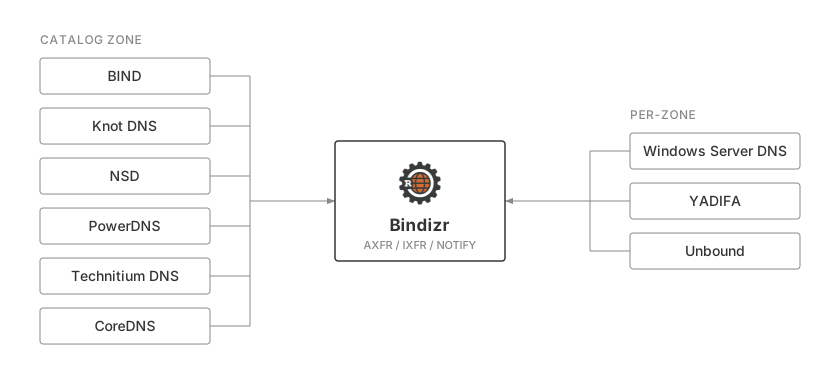
A secondary answers client DNS queries using zones transferred from Bindizr. It follows Bindizr's catalog zone to discover which zones to serve and receives NOTIFY when their records change. A server without catalog zone support can still be a secondary; each zone is then declared on it by hand.
The examples below assume Bindizr listens on 127.0.0.1:5300 and the
secondary on port 53. For servers on different hosts, use reachable addresses
and allow DNS traffic between them over TCP and UDP.
Catalog zone secondaries
These learn every zone from the catalog: create a zone in Bindizr and it appears on them, delete it and it goes away.
| Catalog zones | Verified on | Notes | |
|---|---|---|---|
| BIND | 9.18 or newer | 9.18, 9.20 | |
| Knot DNS | 3.1 or newer | 3.2, 3.4, 3.5, 3.6 | |
| NSD | 4.9 or newer | 4.14 | |
| PowerDNS | 4.7 or newer | 4.7, 4.8, 4.9, 5.0, 5.1 | AXFR only; does not sign member transfers |
| Technitium DNS | Secondary Catalog zone | 15.5 | |
| CoreDNS | 1.14.6 or newer | 1.14.6, 1.14.7 | AXFR only, no TSIG; NSEC3-signed zones refused |
Per-zone secondaries
These transfer, take NOTIFY, and serve the zones they are given, but do not read the catalog, so each zone Bindizr serves is added on the server.
| Verified on | Notes | |
|---|---|---|
| Windows Server DNS | 2019, 2022, 2025 | No TSIG for zone transfers |
| YADIFA | 2.6 | |
| NSD before 4.9 | 4.6 | |
| Unbound | 1.25 | No TSIG; changes arrive on SOA refresh |
| CoreDNS before 1.14.6 | 1.14.4 | AXFR only, no TSIG; NSEC3-signed zones refused |
"Verified on" is the version Bindizr's own interoperability run covers: initial transfer of a zone spanning several messages, NOTIFY-driven updates as IXFR deltas where the server asks for them, record deletion, a DNSSEC-signed zone, TSIG-signed transfers where the server supports them, and, for catalog zone secondaries, zone creation and deletion.
What the secondary has to do
A catalog zone secondary does two things, whatever the implementation:
- Transfer the catalog zone from Bindizr.
dns.catalog_zone_namenames it —catalog.bindizrunless you changed it — and the secondary declares it like any other secondary zone, with Bindizr as its primary. - Provision the zones the catalog names, pulling each from that same primary. Every implementation has its own word for the template those zones are created from; the per-server pages below spell it.
Create a zone in Bindizr and it appears in the catalog; the secondary picks it up on the NOTIFY that follows, with no configuration of its own. Delete the zone and it goes away the same way.
Register the secondary with bindizr secondary create before expecting
NOTIFY or unsigned transfers. Set the same dns.catalog_zone_name in Bindizr
and the secondary; independent Bindizr deployments feeding one secondary need
distinct catalog names. See Secondaries CLI and
Configuration.
A per-zone secondary declares each zone instead, with Bindizr as its primary,
and is registered the same way. Bindizr still sends it NOTIFY for the catalog
zone, which it refuses or leaves unanswered, so secondary check reports a
failure for it; the zones it does serve are unaffected.
Signing the transfers
The registered address authorizes a secondary by where it connects from,
which is all a loopback pair needs. Where the secondary is elsewhere, give it a TSIG
key in a role that holds zone:transfer in all zones, then name it on the
secondary's primary reference. Bindizr answers under that key and each server
page shows the syntax.
bindizr role create secondaries
bindizr role grant secondaries --actions zone:transfer
bindizr tsig-key create xfr-key --role secondaries
The grant must cover all zones
Leave out --zone: a grant naming one zone does not reach the catalog
zone, and a catalog transfer signed by a key without zone:transfer in
all zones are refused. See
Access Control.
PowerDNS does not sign member transfers
BIND, Knot, NSD, and Technitium reuse the catalog zone's key for the member zones that catalog provisions. PowerDNS does not — see PowerDNS.
Bindizr logs every transfer with signed=true or signed=false, so whether a
key was actually used is visible rather than assumed:
Checking that it worked
| Command | Checks |
|---|---|
bindizr doctor |
Installation health and catalog synchronization |
bindizr zone status <zone> |
The member zone's serial on each secondary |
bindizr secondary check <name> |
One secondary's catalog serial and NOTIFY acceptance |
bindizr secondary transfers <name> |
Latest transfers, refusals, and failures |
A synchronized catalog does not guarantee that every member zone loaded. Check the zone's status as well; each server page includes its own inspection command. See Checking a secondary.